
Every client has its own way of doing things. Maybe one client never pays suppliers through e-conomic, or one supplier's bridge tolls are always VAT-exempt. Verifi Memory lets you teach Verifi these rules once, so the same check stops flagging entries you already know are correct.
How it works
When Verifi flags an entry and you press the checkmark and mark it as OK, Verifi saves that as a memory. Next time the same check would flag a similar entry, Verifi looks at what you told it before and decides whether your earlier correction applies.
If it applies, the check is downgraded and shows a note explaining which earlier correction it's based on.
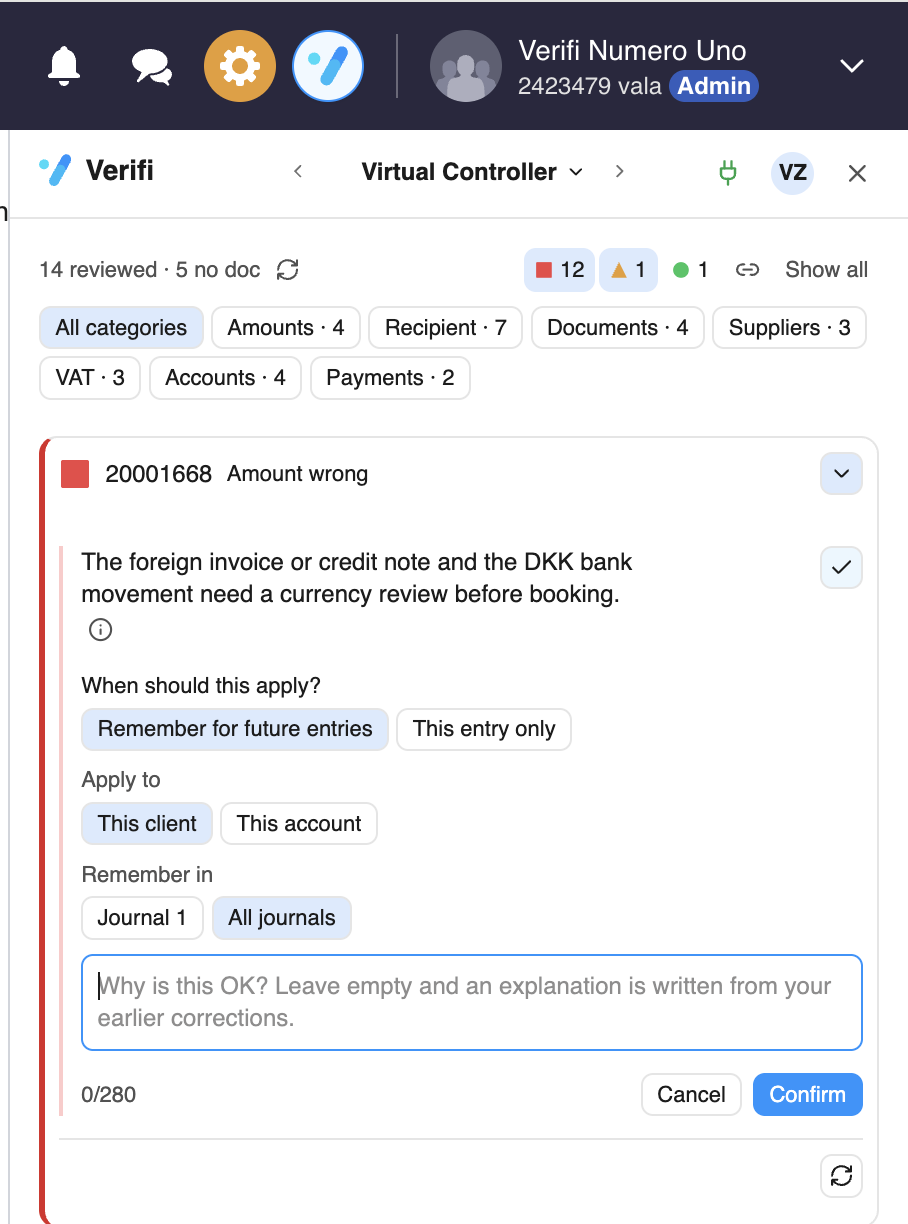
Saving a memory
Open the flagged entry in the Virtual Controller and click the checkmark next to the finding to mark it as OK.
Choose when the rule applies (Hvornår skal dette gælde?):
Husk til fremtidige posteringer – remember this for future entries.
Kun denne postering – approve this entry only. Nothing is saved to memory.
Choose who the rule applies to (Gælder for):
Denne kunde – the whole client, e.g. "payments for this client are never made through e-conomic".
Leverandør [number] – only entries from this supplier.
Konto [number] – only entries posted to this account.
Choose where the rule applies (Husk i):
Kassekladde [name] – only in this journal.
Alle kassekladder – in all of the client's journals.
Write why it's OK in the text field (optional, up to 280 characters). If you leave it empty, Verifi writes an explanation based on your earlier corrections.
Click Bekræft to save, or Annuller to cancel.
Tips for good memories
Write the reason like you'd explain it to a colleague. "Bridge crossing (BroBizz), VAT-exempt, no VAT deduction" works better than "ok".
Keep the rule as narrow as it needs to be. If only one supplier is the exception, choose the supplier, not the whole client.
Use "Kun denne postering" for one-offs. If the entry is a one-time exception, don't save it as a rule.
Name the thing, not just the number. Mentioning the supplier, account or type of cost in your reason helps Verifi match the right entries.
Good to know
Memory never changes anything in e-conomic. It only affects how Verifi shows its checks.
A memory doesn't make Verifi blind. It still compares each new entry with your rule, and shows the check if the entry doesn't fit.
Memory is also a good training tool. Junior colleagues see the reason behind an approval right in the entry.
Something not right?
If a memory is hiding something it shouldn't, or isn't applied when it should be, use the blue Feedback button in Verifi and choose Report an issue. Tell us which entry and which rule, and we'll look into it.